SMS Calendar Sync
Send automated SMS reminders for Google Calendar™ appointments 24 hours in advance. Reduce no-shows, keep clients informed, and manage everything from inside Google Calendar™.

How It Works
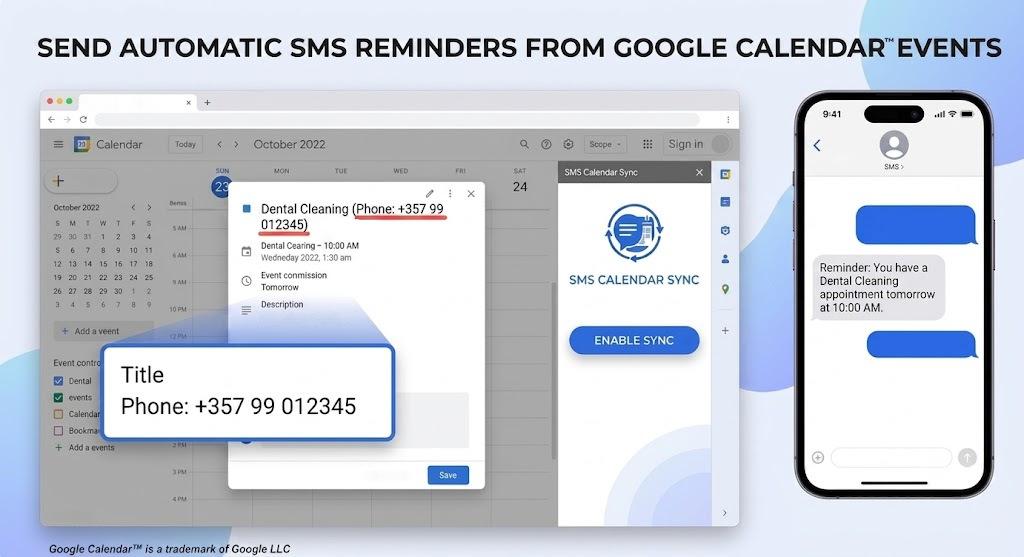
From calendar event to client SMS automation. Add a phone number to your appointment, enable sync, and let the add-on handle the rest.
Install from Google Workspace Marketplace™
Add SMS Calendar Sync to your Google Calendar™ workspace in a few clicks. Works with your existing Google account — no separate login.
Enable sync in the sidebar
Open the add-on panel inside Google Calendar™ and click Enable Sync. Background monitoring starts immediately on an hourly schedule.
Add phone numbers to events
Include the client's phone number in the event title (e.g. "Phone: +357 99 123 456"). The add-on detects and validates it automatically.
See the phone number format note below.
Clients receive SMS reminders
Twenty-four hours before each appointment, a professional reminder is sent with the date, time, and your business details — in Greek or English.
Built for Busy Appointment-Based Businesses
Whether you run a clinic, salon, consultancy, or any business that books clients through Google Calendar™, SMS Calendar Sync keeps everyone on the same page.
Automated Monitoring
The add-on scans your Google Calendar™ events for valid phone numbers in the event title — no manual data entry required.
24-Hour Reminders
Clients receive a professional SMS reminder exactly 24 hours before their scheduled appointment, reducing no-shows and last-minute cancellations.
Hourly Background Sync
Enable sync once and let the add-on run automatically. It checks your calendar every hour so no upcoming appointment is missed.
Manual Dispatch
Review tomorrow's appointments in the sidebar and send reminders to selected clients on demand — useful for last-minute bookings.
Multi-Language Messages
Messages are sent in Greek by default. Add the word "English" anywhere in an event description to send that reminder in English instead.
Secure by Design
Appointment data is transmitted securely through your dedicated microservice. Phone numbers never leave your controlled infrastructure.
Manage Everything in Google Calendar™
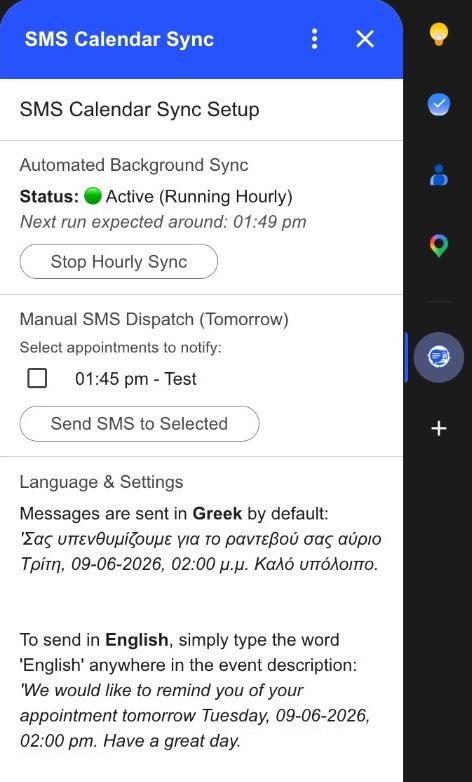
The add-on lives in your Google Calendar™ sidebar — no separate app to open. See sync status, review tomorrow's appointments, send manual reminders, and configure language settings without leaving your calendar.
- Active hourly background sync with next-run visibility
- Manual send for selected tomorrow appointments
- Greek and English message templates with live preview
- Per-event language override via the word “English” in description
Simple, Usage-Based Pricing
SMS Calendar Sync requires an active subscription. You are charged based on the number of SMS messages sent — pay only for what you use, with no hidden fees.
Subscription Required
Install the add-on from Google Workspace Marketplace™, then contact us to activate your subscription. We'll set up your account, configure your microservice connection, and have you sending reminders in minutes.
- Pay per SMS sent — scale with your appointment volume
- Managed setup and onboarding by C&H TechCenter
- Ongoing support for your team and calendar workflows
By using SMS Calendar Sync you agree to our Terms of Service and Privacy Policy.
Google Calendar™, Google Workspace™, and Google Workspace Marketplace™ are trademarks of Google LLC.Ready to cut down on missed appointments?
Join businesses using SMS Calendar Sync to keep clients informed and calendars full. Install from the Marketplace and get in touch to activate your subscription.


